AI
Everyday Uses
Last updated: September 11, 2026
Suggested AI Uses for Research Tasks
Ideation

- Planning code or projects
- Recommending project names or acronyms
- Generating hypotheses
(See this example) - Mining the literature for research ideas
(See this example)
Text

- Summarizing documents or content
- Combining documents
- Transforming format (e.g. text to table)
- Searching & navigating text
- Adjusting communication
Visual Design

- Creating flyers for outreach
- Creating presentation graphics
- Creating logos (Keep in mind that graphic artists are still likely to do a better job of creating something closer to your exact vision!)
Code

- Planning steps
- Refactoring code
- Annotating code
- Writing documentation
- Checking for security or privacy concerns
- Understanding someone else’s code
- Understanding errors
- Proposing code validation/testing ideas
- Translating code to a new language
Project Management

- Developing templates
- Breaking down tasks
- Assigning roles
- Creating meeting agendas and summaries
- Creating lab document drafts
- Code of conduct
(See this resource) - Mentee Agreement
(See this resource) - Lab Handbook
(See this example)
- Code of conduct
Tips for AI Use
- Don’t use prompts that would violate data privacy restrictions or licensing (most commercial tools are not private!)
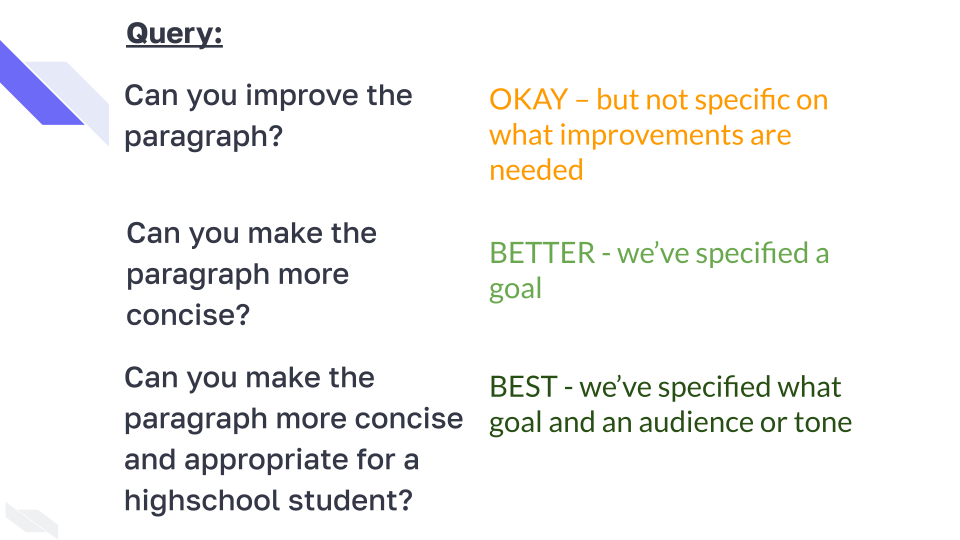
- Be specific and iterate on prompts
- Where possible work in an environment that allows for projects to retain the context
- Typically asking AI to improve existing work is better than starting from scratch
- Check everything! Ask the AI to question itself and have a human (maybe you) review text and code